
41 lines
1.7 KiB
Markdown
41 lines
1.7 KiB
Markdown
# SmartSaveImage
|
||
|
||
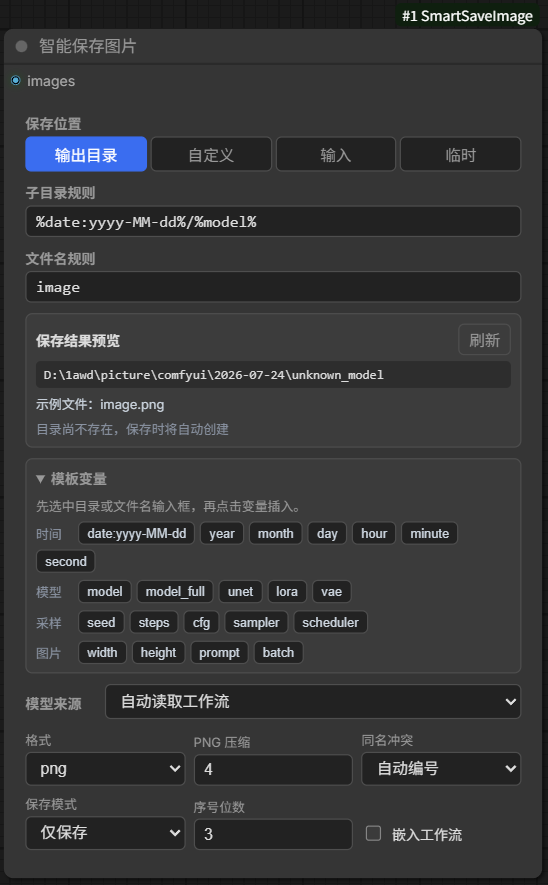
一个带实时路径预览的 ComfyUI 图片保存节点。节点菜单中搜索 **智能保存图片**。
|
||
|
||
## 使用方式
|
||
|
||
1. 连接 `images`。
|
||
2. 选择保存位置;自定义模式可填写绝对路径或相对 `output` 的路径。
|
||
3. 填写子目录规则和文件名规则。
|
||
4. 在“保存结果预览”中确认最终目录与示例文件名。
|
||
|
||
模板变量默认折叠,展开后点击变量即可插入当前规则输入框。
|
||
|
||
## 节点预览
|
||
|
||
|
||
## 模板变量
|
||
|
||
- 时间:`%date:yyyy-MM-dd%`、`%year%`、`%month%`、`%day%`、`%hour%`、`%minute%`、`%second%`
|
||
- 模型:`%model%`、`%model_full%`、`%unet%`、`%lora%`、`%vae%`
|
||
- 采样:`%seed%`、`%steps%`、`%cfg%`、`%sampler%`、`%scheduler%`
|
||
- 图片:`%width%`、`%height%`、`%prompt%`、`%batch%`
|
||
|
||
例如,保存到自定义根目录下的模型文件夹:
|
||
|
||
```text
|
||
子目录规则:krea/%model%
|
||
文件名规则:image
|
||
同名冲突:自动编号
|
||
```
|
||
|
||
## 保存行为
|
||
|
||
- 支持 PNG、JPEG、WebP;PNG 默认压缩等级为 4,与 ComfyUI 自带保存节点一致,可在 0-9 间调整且始终无损;WebP 使用无损保存。
|
||
- 自动编号不会覆盖已有文件;覆盖模式也会保证批量图片互不覆盖。
|
||
- PNG 使用 ComfyUI 原生元数据字段;关闭“嵌入工作流”后不写入生成信息。
|
||
- 保存到 `output`、`input`、`temp` 时直接使用对应预览类型;其他绝对目录使用临时预览。
|
||
- 模型名自动从工作流读取,也可在“模型来源”中手动指定。
|
||
|
||
插件只依赖 ComfyUI 已包含的 Pillow 与 NumPy,不需要额外配置环境。
|